

assess anywhere
trail assessment and mapping services
assessing anywhere
trail assessment &
mapping services
our services
Beneficial Designs offers a variety of services to help maximize the potential of your trail system, ensure compliance with federal standards, increase trail use, and create a safe and beneficial trail environment for people of all abilities. Contact us to inquire more about any of our services, which include:
trail assessment
data processing and reports
GIS data and mapping services
TAI mapping and signage services
training workshops
existing trail and signage review
the process
Beneficial Designs regularly performs High-Efficiency Trail Assessment Process (HETAP) trail assessments across the nation, collecting and processing data, and producing a variety of information displays to communicate trail access information to the public as well as land management.
The following information gives a general overview of each step of the Beneficial Designs trail assessment process, in addition to trail assessment training services.
the process
Beneficial Designs regularly performs High-Efficiency Trail Assessment Process (HETAP) trail assessments across the nation, collecting and processing data, and producing a variety of information displays to communicate trail access information to the public as well as land management.
The following information gives a general overview of each step of the Beneficial Designs trail assessment process, in addition to trail assessment training services.




beneficial services
trail assessment and mapping services
trail assessment and
mapping services
step 1 plan
what is the area to be assessed?
Before beginning a trail assessment, the area to be assessed should be described.
What is the area? Is it a park?
How many trails will need to be assessed and how many segments exist within each trail?
How many miles of trail will need to be assessed?
who will perform the assessment?
Beneficial Designs regularly performs the High-Efficiency Trail Assessment Process (HETAP) for numerous clients. However, you may want to do the assessment yourself. In that case, Beneficial Designs offers training and products so you will be well-equipped and ready to continue the trail assessment process into the future. What method of assessment would you like to use? Take a look at the tools section to determine which method will best suit your needs. Should you choose to perform the assessment, Beneficial Designs is available to work with you to process and display the data if necessary.
what are the end products?
What purpose will the assessment data serve? What is the end goal?
Beneficial Designs offers a variety of products based on your trail assessment data. Some options include:
trail maps
Trail data can be processed and utilized to produce customized trail maps. All relevant objective trail access information is displayed within the map, allowing users to know exactly where they can best travel throughout the trail system. Maps can be displayed on outdoor panels, online, in brochures, or just about anywhere.
Trail Access Information (TAI) SignPosts
Like trail maps, TAI SignPosts provide trail users with the vital trail facts necessary to make informed and safe decisions. TAI SignPosts are designed for individual trails and include more information than is typically shown on a trail map. SignPosts are located at trailheads, ensuring that users will always be informed throughout the trail system.
GIS datasets
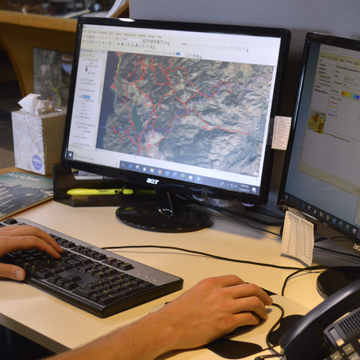
GIS services from Beneficial Designs can provide clients with the ability to take detailed trail assessment data collected using HETAP and add a spatial component. The GPS coordinates collected during the assessment process are used to generate an accurate representation of the trail and then detailed HETAP information is linked to each individual trail or trail segment assessed. Trails that were previously mapped on paper are now able to not only be mapped digitally, but also carry all of the trail assessment data collected as part of the HETAP process.
other?
Have other ideas? Please share! Beneficial Designs would love to work with you to help provide access and information in creative new ways!
what is the budget?
We’re flexible! Let us know what kind of budget you are planning so we can work with you. Various assessment options are available at a range of prices. Contact Beneficial Designs to find out what method will work best for your specific needs.
what is the project time frame?
How much time is available for the project? When is the absolute deadline? When is the best time of year for your trails to be assessed?
Assessing trails takes time and is not always possible during certain seasonal weather conditions. However, while snow poses certain limitations, cross-country ski trails can be assessed. Knowing the number of trail miles will help determine the speed at which the assessment can take place. Beneficial Designs trail assessment coordinators are ready to travel, assess, and train. Just let us know the best times to schedule flights and start the process.
identify all trails that must be assessed
Figuring out which trails to assess can be a complicated process. Here are a few tips to help you get started.
collect basemaps
Any existing trail maps can be used to see which trails will be included in the assessment. Existing maps will also be useful during the assessment process if any new trail maps are to be designed.
confirm trail names and locations
Before assessors head into the field, it is important to confirm all trail names and locations. Make sure to confirm the number and location of segments per trail.
identify trail features to be collected
What type and quantity of features do you want surveyed along the trails? Restrooms, benches, interpretive signage, viewing areas, water spouts etc.?
List all necessary features so that the assessors will know exactly what to look for and assess.
identify and train the assessment team
How many people are available to assess? Are they able to hike the length of your trails?
Have they been trained in the Universal Trail Assessment Process (UTAP), the High-Efficiency Trail Assessment Process (HETAP) and the Developed Outdoor Recreation Assessment Process (PROWAP)?
Beneficial Designs certified trail assessment coordinators are ready to train!
step 2 assess
what is assessed?
The High-Efficiency Trail Assessment Process (HETAP) can be performed on all types of trails, from concrete to dirt to rocky surfaces and narrow ledges. Trail types may include trails for hiking, equestrians, mountain biking, beaches, snowshoeing, cross-country skiing, or motorized vehicles, including ATV, OHV, motorcycle, or snowmachines.
Our assessment process collects objective trail data for trail segments according to two categories: stations and features. More information regarding the specific trail attributes and features assessed can be accessed on our TAI page.
segments
Segments are the building blocks of trails and are necessary for the assembly and rerouting of trails and TAI. Before assessment, each endpoint or intersection within the trail system is labeled as a unique node, which divides the trail network into individual segments. Each segment is named according to the starting and ending node. A single trail may be composed of only one segment or an assembly of multiple segments. Segments may be associated with more than one trail where multiple trails overlap.
The assessment data from each segment included in the trail to be summarized are combined and processed to calculate the final TAI summary data. The Beneficial Designs UTAP and High-Efficiency Trail Assessment Process (HETAP) software can split, reverse, and combine trail segments to process the data and create TAI for the desired trail. The same can be done in Microsoft Excel using macros and the formulas presented in this document.
stations
Stations are the building blocks of segments. A station represents a continuous portion of trail with consistent trail attributes. Each station must, at a minimum, document the grade, cross slope, tread width, surface type, and surface quality of the best path of travel, starting from the beginning of the station up to, but not including, the next station. A new station is recorded when one or more trail attributes significantly change or when a maximum station distance is reached. Depending on the mode of collection, a station may be entered as a single data point and converted to a data line on the backend, or initially collected as a data line associated with the starting point of the line in the direction it was recorded.
In order to calculate Trail Access Information (TAI) and to display specific trail characteristics spatially, such as grade, cross slope, or tread width, station data must be repeatedly measured across the entirety of each segment of trail.
features
Trail features are the natural and human-made components and structures found on or seen from the trail. These may include things such as bridges, culverts, fences, gates, kiosks, restrooms, rocks, stairs, and many others.
Section 7.4.11 of the US Forest Service Trail Accessibility Guidelines requires disclosure of the location and identification of specific trail features and obstacles that do not comply with accessibility requirements. All features, regardless of compliance, should be documented. Feature points should ideally be included in a trail database and displayed along trail lines to provide managers and potential users the ability to determine the location, identification, magnitude, and remaining tread width of each feature.
technical requirements
This objective trail information enables the assessment of the level of compliance with Federal accessibility technical requirements and best practices. The technical requirements for trails and other outdoor recreation features mentioned below can be found in the Architectural Barriers Act (ABA) Standards (2015), which represent the minimum requirements. Best practice guidelines can also be found in the Forest Service Trail Accessibility Guidelines (FSTAG) (2013) and the Forest Service Outdoor Recreation Accessibility Guidelines (FSORAG) (2013).
For more information regarding trail standards and guidelines, please visit our trails standards page.
speed of assessment
Our trail assessment experts have assessed many types of trails across the country and their experience and knowledge expedite the assessment. Using the High-Efficiency Trail Assessment Process (HETAP), a single trail assessor using a cart or single roll-a-wheel should be able to measure grade, cross slope, tread width, surface quality, and obstructions along and beside a trail, at speeds of anywhere from 0.8 to 1.6 mph. This can be done at up to 8 times the speed of a manual assessment using only a smart level, measuring wheel, tape, and the DORAP mobile app (beta). Adding an additional assessor increases the speed at which an assessment can be done and provides an extra hand to measure while data is entered. For more information on the assessment methods, please visit the HETAP tools section.
data collection
Data is entered at each station. Stations can be recorded at any point, but generally are to be recorded at points along the trail when grade, cross-slope, tread width, surface type or firmness and stability changes. Stations should be recorded a minimum of every 25 feet, but the more stations that are recorded, the more accurate the GPS points and the typical grade, cross-slope and tread width information will be along the trail. The High-Efficiency Trail Assessment Process (HETAP) software enables data to be automatically stored to a database and sorted, providing accurate and detailed summary trail reports for analysis. The HETAP software allows station data to be copied over to the next station, allowing users to record all necessary information quickly, without the need to re-enter repeating information like tread width, surface type and firmness and stability.
step 3 process
what happens to the collected data?
Once all the trail data has been collected our assessment coordinators work together to assemble the trail data, piecing together trails and/or segments in the HETAP software. The HETAP data is then specially formatted for ArcGIS and exported as a shapefile. Once shapefiles are imported into ArcGIS, Beneficial Designs can review the data points and confirm the correct placement and assembly of the trails and/or segments. This initial draft displaying all the data points can be converted to KML files for easy viewing by the client in Google Earth or other viewing platforms. After confirmation of the data points, trail lines are stitched together by ArcGIS and polished and refined by our GIS specialists.
data reports
The processed HETAP data is then used to generate Trail Access Information (TAI) reports for each assessed trail. The TAI summary provides management with the vital characteristics that indicate the objective levels of access for a given trail. In addition to general trail information such as name, length, and elevation gain and loss, the amount of typical and worst values are displayed for features such as grade, cross slope, and tread width. Obstacles and trail quality can also be displayed. This information may be analyzed in a variety of ways.

making data visual and accessible
Importing the vast amount of collected data into a GIS environment enables information to be isolated and visualized for clarity and analysis. While a single line may be used to represent a trail, HETAP provides the unique opportunity to include an infinite amount of trail data at any point within a trail. Thus, both station points and segments of a trail are loaded with detailed objective trail information. The quantitative trail data is then represented using both point and line symbols, using a variety of visual variables to illustrate the ranges of data. For example, critical information such as trail grade can be set to graduating colors depending on the steepness of a trail. Red or purple lines might indicate steep sections of the trail, while green or blue areas might represent more level portions.
The ability to immediately observe the location and degree of various trail features allows both trail users and land managers to gain an instant, clear, and objective understanding of the quality of any assessed trail. Areas of a trail out of compliance with accessibility guidelines or beyond the abilities of a certain individual can then be immediately identified and dealt with as desired.
step 4 display
how is the information displayed?
Objective trail data is useful to many users but, without proper communication and design, the information may not reach the intended audience. As mentioned above, Beneficial Designs offers a number of options for displaying the trail data to ensure that trail users are informed.
printed material
Any printed material can be produced in order to distribute Trail Access Information. Brochures, one-page trail summaries, and pocket foldout maps can be developed for any trail system.
trail maps
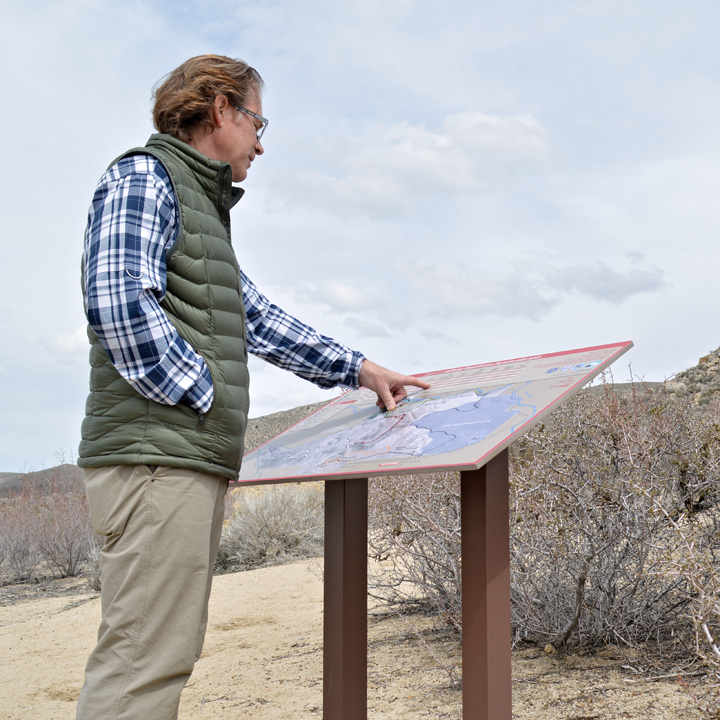
When designing a trail map, whether to be displayed at a trailhead, online, or in printed material, Beneficial Design utilizes the collected data imported into ArcGIS in order to produce an accurate map along with Trail Access Information. Typically, Beneficial Designs uses a combination of satellite imagery and either contour lines or generated hillshade to clearly illustrate the trail system area. Lines representing trails are imported into the map, along with any relevant data, such as roads, features, rivers, and water sources. QR codes can also be incorporated into signage to link to more information about the trail or park. For more examples of previous map projects, take a look at some of our maps in our signage or projects pages.
Panel maps are typically posted at trailheads. Beneficial Designs orders Custom High-Pressure Laminate (CHPL) signage from iZone Imaging, designed to withstand outdoor wear and tear for many years. Both panel and mounting solutions can be found at the iZone Imaging website.
A full list of necessary elements to provide to Beneficial Designs in order to complete a trail map project is available upon request.
Trail Access Information (TAI) SignPosts
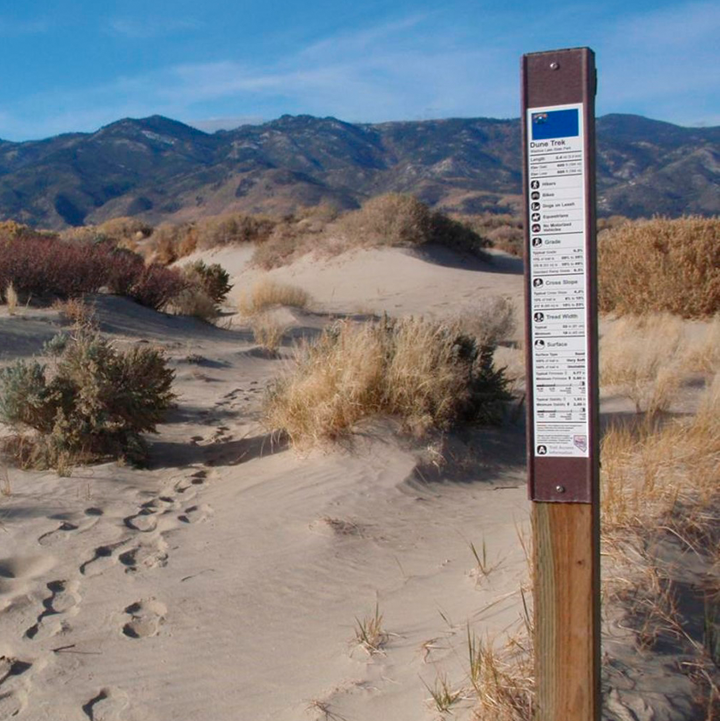
Beneficial Designs offers a number of templatesfor TAI Signposts. These trailhead signs are designed to be mounted either on a 4″x4″ wooden post or a steel post. All relevant trail data is included on these signs, providing the necessary trail information for every user that enters the trail. TAI Signposts are also printed on either eighth or quarter inch Custom High-Pressure Laminate (CHPL) from iZone Imaging. Stickers may also be printed and adhered to carbonite boards. For more info, visit the signage page. QR codes can also be incorporated into Signposts to link to a full panel map of the trail or park.
and more!
The prevalence of smart phones, tablets, and the internet makes instant access to data and maps the new norm. Using HETAP and ArcGIS, Beneficial Designs trail assessment will allow you to receive your data in a digital format that can be used in ArcGIS online, as well as KMZ files that can be imported into Google Earth. This allows easy access to trail name and location, typical grade, typical cross slope, elevation gain/loss and allowed uses. Online map formats allow users and management more flexibility and options to interact with trail data.
training workshops
equip your team to assess
The High-Efficiency Trail Assessment Process (HETAP) is an automated version of the Universal Trail Assessment Process (UTAP), utilizing both specialized software and hardware. A HETAP/UTAP training will not only teach you how to look for the issues in a trail system but also how to measure them using the system. Beneficial Designs provides the necessary training for management and staff to walk down a trail and catch all of the attributes that need to be addressed.
Training workshops generally last a minimum of 2 days and consist of both classroom and hands-on training. The first day is spent in the classroom explaining the various reasons you might be assessing your Outdoor Recreation features and trails, what you will be assessing, and the details of how to conduct assessments. The second day will be a hands-on field assessment of a nearby trail(s), followed by an in-class example of how to process the data into Trail Access Information. Lastly, the attendees have a chance to take the Trail Assessment Coordinator exam to become a Certified Trail Assessment Coordinator through Beneficial Designs and American Trails.
Let's roll!
Trail Access Information (TAI)
Click below to learn more about TAI and how it should be included in all trail databases